Your cookie banner is probably illegal (and how to actually fix it)
You've seen them everywhere:
This website uses cookies.
Accept All
Or even worse:
We use cookies to improve your experience.
✕
A simple banner, a quick click (or just closing it), and you're done. Compliant, right?
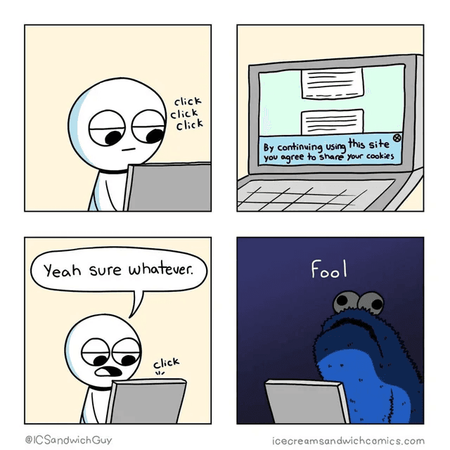
Wrong! That cookie banner you slapped on your website? It's probably illegal. And you're not alone. The majority of websites get this fundamentally wrong.
The cookie banner illusion
Here's the uncomfortable truth: displaying a cookie banner doesn't make you compliant. In fact, most implementations actively violate GDPR, UK PECR, CCPA, and other privacy regulations. The banner itself has become a fig leaf: something that looks like compliance while doing nothing to actually protect user privacy.
Let's break down what's actually going wrong.
Common cookie banner mistakes (that are actually illegal)
1. Cookies are set before consent
This is the most common violation. Visit most websites and open your browser's developer tools. You'll see cookies being set the moment the page loads, before you've clicked anything.
Under GDPR, non-essential cookies require prior consent. That means zero tracking cookies, zero analytics cookies, zero advertising cookies until the user explicitly agrees. If your Google Analytics is firing on page load, you're already breaking the law.
2. Pre-checked consent boxes
Those cookie preference panels with checkboxes already ticked? Illegal under GDPR. Consent must be freely given, which means users must take an affirmative action to opt in. Pre-checked boxes don't count.
3. Dark patterns in consent UI
"Accept All" in a big, colorful button. "Manage Preferences" in tiny gray text. "Reject All" buried three clicks deep or missing entirely.
This isn't compliance. It's manipulation. Regulators are increasingly cracking down on these dark patterns. The reject option must be as easy to access as the accept option. Period.
4. No granular control
"Accept" or "Leave the website" isn't a real choice. Users must be able to accept some cookies while rejecting others. Analytics? Maybe. Advertising? No thanks. This granular control isn't optional. It's required.
5. Assuming legitimate interest covers everything
"Legitimate interest" has become a catch-all excuse for tracking without consent. But it doesn't work that way. Marketing cookies and behavioral advertising almost never qualify for legitimate interest. If you're using this as your legal basis for tracking, you're likely wrong.
What about functional cookies?
Here's where it gets nuanced. Not all cookies require consent. Strictly necessary cookies (those essential for the website to function) are exempt from consent requirements.
Examples of truly essential cookies:
- Session cookies for logged-in users
- Shopping cart cookies on e-commerce sites
- Load balancing cookies
- Cookie consent preference storage (yes, the irony)
- Anti-bot and security cookies (like Cloudflare's
__cf_bmand_cfuvid)
Examples that are NOT essential (despite what some claim):
- Analytics cookies (your site works fine without them)
- A/B testing cookies
- Personalization cookies
- "Functional" cookies that remember preferences like language (debatable, many regulators say these need consent)
The key test: Would the website break without this cookie? If the answer is no, you need consent.
Be honest with yourself here. Many companies abuse the "functional" category to avoid consent requirements. Regulators aren't fooled, and neither are privacy-conscious users.
LocalStorage and SessionStorage: the forgotten trackers
Here's something most developers miss entirely: GDPR and ePrivacy regulations don't just cover cookies. They cover all client-side storage mechanisms.
That includes:
localStoragesessionStorage- IndexedDB
- Web SQL (deprecated but still exists)
- Cache API
If you're storing user identifiers, tracking data, or any information that could be used to identify or profile users in localStorage, you need consent. Just like cookies.
Common localStorage violations
// This needs consent just like a tracking cookie!
localStorage.setItem("user_id", "abc123");
localStorage.setItem("visited_pages", JSON.stringify(["/home", "/products"]));
localStorage.setItem("ab_test_variant", "B");
What's allowed without consent
Similar to cookies, truly functional storage is permitted:
- Storing user preferences after they've explicitly set them
- Draft content in a text editor
- Items in a shopping cart
- Authentication tokens (for logged-in functionality)
The gray areas
Some uses are genuinely ambiguous:
- Theme preference (dark/light mode): probably okay, but document it
- Language preference: debatable, safer to ask
- "Don't show this popup again": very gray area
When in doubt, either ask for consent or simply don't store the data.
It's not just cookies: the hidden trackers on your site
Cookie banners focus on, well, cookies. But GDPR and similar laws protect against all unauthorized data processing. Here are the hidden trackers most developers miss:
Google Fonts: the invisible tracker
Using Google Fonts via their CDN (fonts.googleapis.com)? Every time a user loads your page, their IP address is sent to Google. This constitutes personal data transfer to a US company, which is a GDPR violation since the Schrems II ruling.
The fix:
- Self-host your fonts: download and serve them from your own server
- Use privacy-friendly alternatives like Bunny Fonts. Same fonts, GDPR compliant, drop-in replacement
<!-- Instead of Google Fonts -->
<link
  href="https://fonts.googleapis.com/css2?family=Inter&display=swap"
  rel="stylesheet"
/>

<!-- Use Bunny Fonts -->
<link href="https://fonts.bunny.net/css?family=Inter" rel="stylesheet" />
YouTube embeds: cookies before play
Standard YouTube embeds set cookies the moment they load, not when the user clicks play. This means you're tracking users without consent just by having a video on your page.
The fix:
- Use YouTube's no-cookie domain:
youtube-nocookie.com - Better yet, use a facade/wrapper like lite-youtube-embed that only loads YouTube after user interaction
- Even better: show a thumbnail with a "Play" button that loads the actual embed only after click (with a consent notice if needed)
<!-- Instead of standard embed -->
<iframe src="https://www.youtube.com/embed/VIDEO_ID"></iframe>

<!-- Use no-cookie variant -->
<iframe src="https://www.youtube-nocookie.com/embed/VIDEO_ID"></iframe>
Vimeo embeds: use the dnt parameter
Vimeo offers a Do-Not-Track parameter that reduces (but doesn't eliminate) tracking:
<!-- Standard Vimeo embed -->
<iframe src="https://player.vimeo.com/video/VIDEO_ID"></iframe>

<!-- With Do-Not-Track enabled -->
<iframe src="https://player.vimeo.com/video/VIDEO_ID?dnt=1"></iframe>
Important caveat: The dnt=1 parameter reduces tracking but doesn't make the embed fully GDPR-compliant. Some cookies (like Cloudflare's security cookies) may still be set. For full compliance, you still need a two-click solution or consent wrapper.
Google Maps, social widgets, and other embeds
The same principle applies to:
- Google Maps embeds
- Facebook Like buttons
- Twitter/X embeds
- Instagram embeds
- Any third-party widget
Each of these can set cookies and track users without consent. The solution is consistent: either don't embed them, or use a consent wrapper that loads them only after explicit user approval.
Even government sites get it wrong
You might think government websites would be compliant. After all, they're often the ones enforcing these regulations. You'd be wrong.
A quick audit of various European government websites reveals a concerning pattern: many set tracking cookies before asking for consent, display banners with only an "Accept" button (no way to decline), or skip the consent mechanism entirely while still running Google Analytics.
These aren't obscure websites. These are official institutions in EU member states, the very entities that should be leading by example. If government sites responsible for enforcing privacy regulations can't get this right, it highlights just how widespread the problem really is.
Why is this so hard to get right?
Cookie compliance isn't just a legal checkbox. It's a technical challenge that requires deep understanding of how browsers, scripts, and consent mechanisms interact.
Here's the uncomfortable truth: not every developer or web agency understands this. Many treat cookie banners as a "drop in some code and forget about it" solution. But proper implementation requires:
- Understanding the order of script execution (consent scripts must load before any trackers)
- Knowing how to conditionally load third-party scripts based on consent status
- Configuring auto-blocking correctly (many CMPs offer this, but it must be the very first script on your page)
- Testing that cookies are actually blocked, not just that a banner appears
Some consent platforms offer "auto-blocking" features that automatically detect and block tracking scripts until consent is given. This sounds great, but there's a catch: the auto-blocking script must be loaded before everything else on your page. If your Google Analytics or Meta Pixel loads before the consent script, auto-blocking won't help.
If you're not confident in your technical understanding of this area, hire experts who specialize in privacy compliance. The cost of getting it wrong (fines, legal issues, reputation damage) far exceeds the cost of doing it right from the start.
A real-world audit (with permission)
We recently audited a friend's website to check their cookie compliance. Here's what we found:
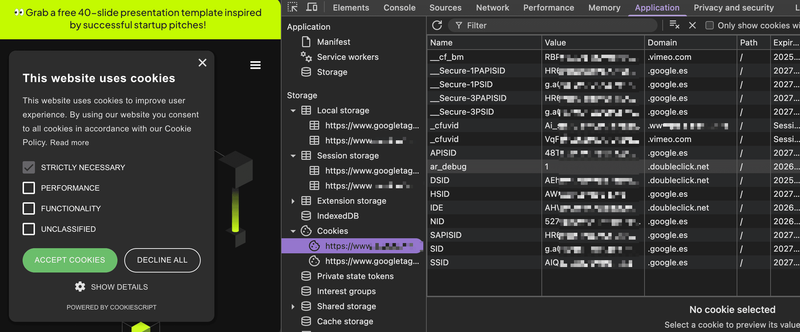
This is a common pattern: the site has a cookie banner, but tracking cookies are already set before any user interaction. The banner becomes purely decorative, a legal fig leaf that doesn't actually protect user privacy or comply with regulations.
The regulations you're probably violating
GDPR (European Union)
- Requires prior consent for non-essential cookies
- Consent must be freely given, specific, informed, and unambiguous
- Users must be able to withdraw consent as easily as they gave it
- Fines: up to €20 million or 4% of global annual turnover
UK PECR (United Kingdom)
- Similar to GDPR but with its own enforcement
- The ICO has been increasingly active in enforcement
- Same consent requirements for cookies
CCPA/CPRA (California)
- Different approach: opt-out rather than opt-in
- But still requires clear disclosure and easy opt-out
- "Do Not Sell My Personal Information" link required
- Expanding to cover more businesses each year
Other jurisdictions
Brazil (LGPD), Canada (PIPEDA), and many others have similar requirements. If your website is accessible globally, you need to consider all of them.
How to actually do this right
Step 1: Audit your current tracking
Before fixing anything, understand what you're currently doing:
- Clear your cookies and visit your site
- Open DevTools → Application → Cookies
- Note every cookie set before any interaction
- Check Network tab for third-party requests
You'll probably be surprised (and concerned) by what you find.
Step 2: Implement proper consent management
A proper consent solution must:
- Block all non-essential cookies by default
- Wait for explicit consent before setting any tracking cookies
- Provide equal prominence to accept and reject options
- Allow granular control over cookie categories
- Remember the choice (ironically, using a cookie)
- Make it easy to change preferences later
Cookie consent solutions worth considering
There are many consent management platforms (CMPs) available. Here are some popular options:
CookieYes - User-friendly, reasonable pricing, good for small to medium sites. Offers auto-scanning and categorization of cookies.
Osano - Enterprise-focused with strong compliance features. Transparent pricing model.
OneTrust - The 800-pound gorilla of consent management. Comprehensive features, used by Fortune 500 companies, but priced accordingly (think thousands per year). Overkill for most small to medium businesses.
Termly - Free tier available, good documentation. Includes policy generators.
Iubenda - European company, strong GDPR focus. Also generates privacy policies.
HubSpot Cookie Banner - If you're already on HubSpot, their built-in cookie banner is free and works well. It automatically handles HubSpot's own tracking code and supports Google Consent Mode v2 natively. However, if you have third-party scripts, you'll need to wrap them using the Cookie Banner API.
HubSpot implementation example:
// Wait for HubSpot cookie banner to be ready
var _hsp = (window._hsp = window._hsp || []);

// Check consent before loading third-party scripts
_hsp.push([
  "addPrivacyConsentListener",
  function (consent) {
    // consent.categories contains: analytics, advertisement, functionality

    if (consent.categories.analytics) {
      // User consented to analytics - load your scripts
      loadGoogleAnalytics();
      loadHotjar();
    }

    if (consent.categories.advertisement) {
      // User consented to ads - load marketing pixels
      loadMetaPixel();
      loadLinkedInInsight();
    }
  },
]);

// Helper function example
function loadGoogleAnalytics() {
  var script = document.createElement("script");
  script.src = "https://www.googletagmanager.com/gtag/js?id=G-XXXXXXX";
  document.head.appendChild(script);
}
HubSpot's banner categorizes cookies into three groups: Analytics (for tracking and statistics), Advertisement (for marketing and retargeting), and Functionality (for enhanced features). Your consent banner lets users accept or reject each category independently.
Cookiebot - Popular and technically solid solution with automatic cookie scanning and categorization. Good compliance features and wide CMS integrations.
Self-hosted options: For developers who want full control, consider open-source solutions like Klaro or Tarteaucitron. More work to set up, but no ongoing costs and complete customization.
Google Consent Mode: the new standard for Google tools
If you're using Google Analytics 4, Google Ads, or Google Tag Manager, you need to know about Google Consent Mode. Starting March 2024, Google requires Consent Mode for any site collecting data from EU users.
What is Consent Mode? It's a way to communicate user consent choices to Google's tags. Instead of blocking Google scripts entirely, Consent Mode adjusts their behavior based on consent status:
- Consent granted: Full tracking as usual
- Consent denied: Google tags still load but operate in a privacy-preserving mode, using cookieless pings and modeled conversions
The two versions:
- Basic Consent Mode: Google tags don't load until consent is given. Simple but you lose all data from users who decline.
- Advanced Consent Mode: Google tags load immediately but in restricted mode. When consent is denied, Google uses modeling to fill data gaps. More data, but some privacy advocates question whether this truly respects a "no" from users.
How to implement:
// Default state before user choice (deny all)
gtag("consent", "default", {
  ad_storage: "denied",
  ad_user_data: "denied",
  ad_personalization: "denied",
  analytics_storage: "denied",
});

// Update when user gives consent
gtag("consent", "update", {
  ad_storage: "granted",
  analytics_storage: "granted",
});
Most CMPs listed above support Consent Mode integration out of the box. If you're building a custom solution, make sure to implement it correctly, Google now shows compliance status in your GA4 and Google Ads dashboards.
Step 3: Self-host what you can
- Fonts: Download and serve locally, or use Bunny Fonts
- Icons: Host your own instead of using CDN-hosted icon fonts
- Analytics: Switch to privacy-friendly alternatives (see below)
Step 3.5: Consider cookie-free analytics
Here's a radical idea: what if your analytics didn't need cookies at all?
Plausible Analytics and Fathom Analytics are privacy-first analytics tools that:
- Don't use cookies at all
- Don't track individual users
- Are fully GDPR, CCPA, and PECR compliant out of the box
- Provide meaningful insights without invasive tracking
- Can be self-hosted (Plausible) for complete data ownership
Matomo (formerly Piwik) offers a self-hosted option where you own all the data. With proper configuration, it can run without cookies too.
The trade-off? You won't get individual user journeys or cross-session tracking. But honestly, do you really need that? Most businesses can make better decisions with aggregate data anyway, without the legal headaches and privacy concerns.
Step 4: Use consent wrappers for necessary embeds
For content you must embed (videos, maps), implement a two-click solution:
- Show a placeholder with a thumbnail/preview
- Display a clear message: "Click to load YouTube video. This will set cookies from YouTube."
- Only load the actual embed after user clicks
Step 5: Document everything
Maintain a clear cookie policy that lists:
- Every cookie your site uses
- Its purpose
- Its duration
- Whether it's first-party or third-party
This isn't just good practice. It's legally required.
The business case for real compliance
"But tracking is essential for our business!"
Is it, though? Consider switching to first-party data and privacy-safe signals. This approach not only keeps you compliant but often provides better insights than invasive tracking.
- Privacy-respecting analytics can give you the insights you need without tracking individuals
- First-party data (email signups, purchases) is more valuable than third-party cookies anyway
- Trust matters: users increasingly choose privacy-respecting businesses
- Future-proofing: third-party cookies are dying regardless (Chrome's deprecation, Safari's ITP, Firefox's ETP)
Companies that figure out privacy-first marketing now will have a significant advantage as regulations tighten and browsers block more tracking.
Conclusion: compliance isn't a banner
A cookie banner is not a magic compliance wand. Real privacy compliance requires:
- Technical implementation that blocks tracking until consent
- Honest UI that makes rejecting as easy as accepting
- Self-hosting resources that would otherwise leak data
- Consent wrappers for necessary third-party content
- Documentation of what you collect and why
The era of "just add a cookie banner" is over. Regulators are issuing fines, browsers are blocking trackers, and users are paying attention.
The good news? Building a privacy-respecting website isn't that hard. It just requires actually respecting privacy, not just pretending to.
And while you're rethinking your approach to user privacy, consider your email strategy too. We took it to the extreme with ZeroMail, our policy of sending zero marketing emails. Not for everyone, but worth thinking about.
Need help with cookie compliance?
Not sure if your website is compliant? We can help. Our team offers cookie compliance audits where we analyze your site, identify issues, and provide actionable solutions to make your website GDPR, CCPA, and PECR compliant.
What we offer:
- Full cookie and tracking audit
- Identification of compliance gaps
- Implementation recommendations
- HubSpot cookie banner setup and configuration
- Third-party script management
Get in touch to discuss your website's privacy compliance.
May the 4th be with you,
Alex