The free backlink strategy tech publishers keep ignoring
If you run a technical blog, you probably spend hours crafting tutorials, writing how-tos, and polishing documentation. You might even have a solid keyword strategy and a content calendar that would make any marketing team proud.
But here's a question worth sitting with: what happens to the code snippets inside those posts?
For most publishers, the answer is... nothing. They sit inline, formatted in a <pre> tag or a syntax-highlighted block, doing absolutely zero work outside the page they live on. They don't get indexed separately. They don't generate referral traffic. They don't earn backlinks.
And that's the missed opportunity nobody talks about.
It gets worse than inline code blocks
That's the best-case scenario, by the way. Some companies at least use proper <pre> blocks with syntax highlighting. Plenty of others don't even bother with that.
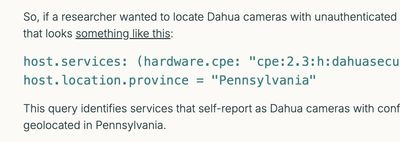
The worst offenders? Screenshots of code pasted straight into blog posts. Not selectable, not searchable, not accessible. Just a flat image of text that Google can't read and developers can't copy. It's dead content in every sense of the word.
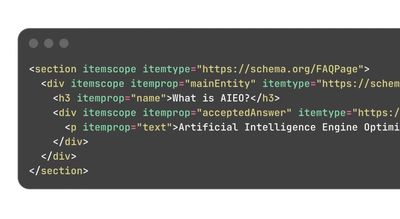
Then there's the inconsistency problem. You'll see a blog post where one code block uses a monospace font at 14px, the next one is somehow larger, the third is in a completely different style, and somewhere along the way the CMS "helpfully" auto-converts parts of the code into clickable links. URLs in config files, domain names in examples, email addresses in sample data - all suddenly hyperlinked.
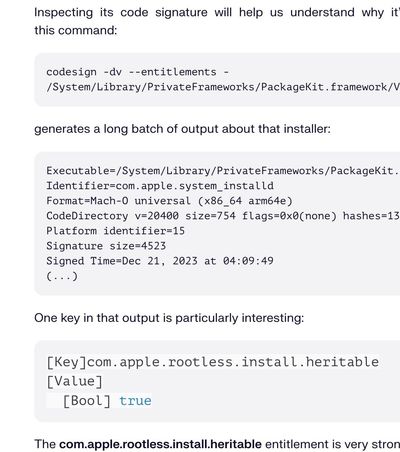
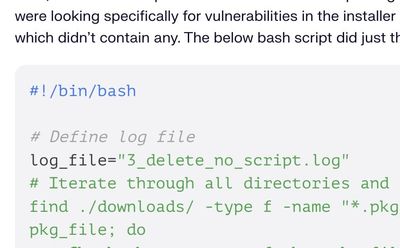
Nobody notices. Nobody fixes it. The post goes live.
And here's where it goes from sloppy to genuinely dangerous: those auto-generated links can point to malicious sites. This is especially common on security research blogs - the ones analyzing malware, reverse-engineering exploits, and publishing IOCs (indicators of compromise). The code they're sharing often contains malicious domains, C2 server addresses, and phishing URLs by design. When a CMS auto-links those strings, a legitimate security company suddenly has live, clickable links to actual malware infrastructure on their blog. Visitors might click. Search engines will crawl. And the company's reputation takes a hit it never saw coming.
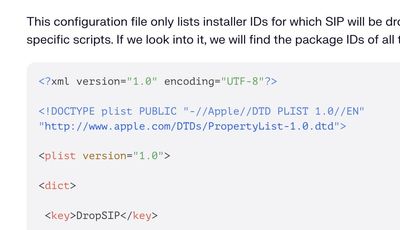
I've seen this on blogs from well-known, respected companies in the security space. Companies that should know better. Companies with dedicated security teams. And yet their blog engine quietly turns code samples into a link farm for threat actors.
All of this - the screenshots, the inconsistent formatting, the accidental malicious links - comes from the same root cause: nobody treats code snippets as first-class content. They're an afterthought. Something you paste in and move on.
But what if you treated them differently?
The backlinking problem in technical content
Every SEO guide will tell you the same thing: quality backlinks from high-authority domains are one of the strongest signals for ranking. The usual advice is to write guest posts, run outreach campaigns, build relationships with editors, or create "linkable assets" like infographics and research reports.
All of that works. All of that also takes a lot of time and energy.
What these guides rarely mention is that technical publishers already produce linkable assets every single day. Code snippets, configuration examples, utility functions, starter templates... these are all things developers actively search for, bookmark, and share. The problem is that when a code block is just embedded inline in a blog post, it has no independent life. It can't be discovered on its own. It can't be linked to separately. It's locked inside your page.
GitHub Gists: the backlinking tool hiding in plain sight
GitHub consistently ranks among the top websites on the internet by domain authority. We're talking DR 95+ territory. That puts it in the same league as Wikipedia, government sites, and major news outlets. Any link from a domain that strong carries real weight.
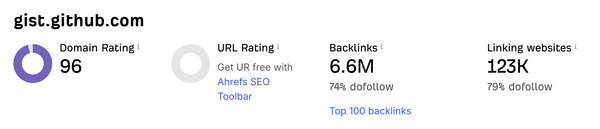
Now here's the thing most people overlook: GitHub Gists are indexed by Google. Every Gist you create lives on gist.github.com as its own standalone page, fully crawlable and searchable. And every Gist has a description field where you can add context... including a link back to the original article on your site.
So the workflow looks like this:
- You write a technical blog post with code examples
- You publish those code snippets as GitHub Gists on your account
- In each Gist's description, you add context and a link back to the full article
- You embed the Gist into your blog post instead of using a static code block (here's what that looks like in practice)
What you get in return:
- A backlink from one of the highest-DA domains on the web. The Gist page on GitHub points back to your article. That's a real, crawlable, high-authority link. Now, a fair caveat: GitHub marks links in Gist descriptions as
nofollow, which technically tells search engines not to pass link equity. But here's the nuance - your URL still appears as indexable text on a DR 96 domain. Google sees it, crawls it, and since 2019 treatsnofollowas a hint rather than a hard rule. The referral traffic is real, the brand signal is real, and the faster indexation of your pages is real. - A secondary discovery channel. Developers search GitHub directly for code snippets. Your Gist can show up in those results, driving referral traffic to your site.
- Social proof and shareability. Gists can be starred, forked, and commented on. Each interaction increases visibility and creates more surface area for your content.
- Evergreen content that works for you. Unlike social media posts that disappear in hours, a well-described Gist sits there indefinitely, quietly passing authority and sending traffic.
- GitHub is a social network, not just a code repo. People forget this. GitHub has followers, activity feeds, stars, and trending pages. Every Gist you publish shows up in your followers' feeds. As your Gists get starred and forked, your account grows, which means more eyes on everything you publish next. It compounds the same way Twitter or LinkedIn does - except your audience is developers, the exact people reading your technical blog.
And the best part? It costs nothing. No outreach. No negotiations. No waiting for someone to approve your guest post. You're leveraging content you already produce.
The compound effect
Here's where it gets interesting. One Gist linked back to one article is nice. But if you're publishing technical content regularly, say 2-4 posts per month, and each post has 2-3 code examples, you're looking at 4-12 new Gists per month. In a year, that's 50-150 indexed pages on GitHub, all pointing back to your site.
That's not a trickle. That's a pipeline.
Each Gist can rank for long-tail developer queries. Each one puts your domain name on a DR 96 page that Google crawls regularly. And because GitHub's authority is so high, these pages often index faster than content on newer or lower-authority sites - and they pull your linked pages into Google's crawl queue with them.
Over time, this creates a flywheel: more Gists mean more indexed pages referencing your domain, more referral traffic, more brand signals to Google, which makes your articles easier to discover, which drives more traffic... you get the idea.
And if you have developers on your team who are building their personal brand on GitHub - even better. They can publish Gists from their own profiles, mentioning the company blog and the organization's GitHub account in the description. Their personal network sees the Gist, follows the link to your article, maybe follows your org. The developer grows their social profile, your company grows its reach. It's a win-win that most companies completely overlook, because they still think of GitHub as just a code repository. It's not. It's a social network with 100M+ developers on it.
Why most publishers don't do this
Honestly? Friction.
Copying a code block, going to GitHub, creating a Gist, writing a description, grabbing the embed code, and pasting it back into your CMS... it's not hard, but it's just enough extra steps that most people skip it. Especially when you're on a deadline and the inline code block "works fine."
The other reason is that most CMS platforms don't make Gist embedding straightforward. WordPress has plugins for it. Static site generators handle it reasonably well. But if you're on a platform like HubSpot, where the content editor is more marketing-focused, embedding a Gist traditionally meant dropping raw <script> tags into custom HTML modules and hoping for the best.
That's actually why we built the Code Snippet Embed module for HubSpot. It lets you paste a Gist embed code directly into the page editor, with full control over styling, line highlighting, light/dark themes, and caching for performance. No custom code, no <script> tag wrangling. Just paste and publish.
But the strategy itself isn't platform-dependent. Whether you're on HubSpot, WordPress, Astro, Next.js, or anything else... the principle is the same. If you're publishing technical content with code examples, those snippets should live on GitHub as Gists, with descriptions that link back to your article.
Making it work: practical tips
Write meaningful Gist descriptions. Don't just paste the code and leave the description blank. Write 1-2 sentences explaining what the snippet does and where it's from: "Utility function for debouncing API calls in React. Full tutorial: [link to your article]." This is what Google indexes. This is what developers see when they find your Gist.
Use multi-file Gists when it makes sense. If your tutorial has a component file, a config file, and a test file, bundle them into a single Gist. Multi-file Gists look more substantial and are more useful to developers, which means more stars and forks. And when it comes to embedding, you don't have to show all files at once - our Code Snippet Embed module for HubSpot lets you pick a single file from a multi-file Gist to display. One Gist, multiple embeds across different articles, each showing only the relevant file.
Name your files properly. gistfile1.txt tells nobody anything. useDebounce.ts or nginx.conf immediately signals what the snippet is about and helps with discoverability.
Keep Gists updated. If you update the code in your article, update the Gist too. Since the embed is live, your blog post automatically reflects the changes. No stale code blocks.
Don't embed everything. A one-line terminal command doesn't need to be a Gist. Save it for meaningful snippets: functions, configurations, templates, examples that have standalone value.
The bottom line
Technical publishers sit on an unfair advantage they rarely use. Every code snippet is a potential reference on a DR 96 domain. Every Gist is a discoverable, indexable page that can drive traffic on its own.
The strategy is simple. The effort is minimal. The compound returns over months and years are significant.
Stop letting your code snippets be dead weight. Put them to work.
May the 4th be with you,
Alex