Global Modules
Footer
The Global Footer modules provide footers for pages and landing pages for your site.
You can check the demo page here
Global Footer
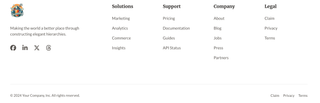
Settings
- Logo: The logo of your choice for your website
- About Company: Text placed below the logo in your footer. Typically used for a company slogan.
- Social Links: Social Media icon links for your company / service. Every icon in Social Links has the following settings:
- Social Link: The url to your social media account (e.g Facebook, Twitter, Threads etc.)
- Title: The title for your social media icon link.
- Footer Menu: The footer menu includes links or options usually found at the bottom of a webpage for quick access to additional information or site navigation. You may create a new menu or modify the default one for more customisation.
- Copyrights: Rich text module where you insert your copyright policy (© 2024 Company Name. All rights Reserved, an example). You may use a dynamic year, by using ''.
- Footer Legal Menu: (Optional) The footer legal menu consists of links or options typically placed at the bottom of a webpage, providing access to legal information such as terms and conditions, privacy policies, and copyright notices.
Global Footer LP
This Global Footer Module is specifically designed for landing pages.

Settings
- Copyrights: Rich text module where you insert your copyright policy (© 2024 Company Name. All rights Reserved, an example). You may use a dynamic year, by using ''.
- Footer Legal Menu: (Optional) The footer legal menu consists of links or options typically placed at the bottom of a webpage, providing access to legal information such as terms and conditions, privacy policies, and copyright notices.
Keep it fresh, keep it clean. When you're ready for more power, visit the Knowledge Base for Pro Modules and full docs.