---
title: "How to deal with cookie consent on your site: a 101 guide"
description: "Cookie consent done right: how GDPR, ePrivacy, and CCPA actually work, plus three ways to implement a compliant banner on your site."
author: "Andrea Tendero"
date: "2026-05-15T12:00:00.000Z"
url: "https://freshjuice.dev/blog/how-to-deal-with-cookie-consent-in-your-site-a-101-guide/"
---
# How to deal with cookie consent on your site: a 101 guide
May 15, 2026 • Written by [Andrea Tendero](https://freshjuice.dev/authors/atenlotrad/)
That banner, that annoying banner all of us marketers must implement on our websites to inform users about how their data is being used, is something that very few website owners do right and something that we should care about a lot more than we do.
Cookie consent is one of the most important legal implementations you must be compliant with, as the fines can be as high as 10 million or 2% of the annual global turnover for mild breaches, [as stated by CookieScan](https://www.cookiescan.com/gdpr-cookie-fines-explained/?utm_source=freshjuice.dev). The funny part is that, while reading that very article about GDPR fines, we decided to audit CookieScan’s own site (on May 15, 2026) using [ConsentTheater](https://consenttheater.org/extension/?utm_source=freshjuice.dev), a browser extension that checks which cookies and trackers fire before a user gives consent. The result was a bit surprising. A banner did show up and blocked the page with three buttons (Adjust, Reject all, Accept all), but before we touched any of them, with no consent given and no rejection, two Google Analytics cookies (`_ga` and `_ga_G2VHD35HF2`) were already sitting in our browser, quietly feeding behavioral data straight into Google’s advertising ecosystem.
To make it more curious, the banner’s own preferences panel marks `_ga` as “exempt” and “always on”, which is a bit of a stretch since under GDPR analytics cookies are not exempt and do require explicit consent. So a company that sells cookie compliance, on a banner literally “powered by CookieScan”, is dropping non-exempt trackers before the visitor has made a single decision. You really can’t make this up.
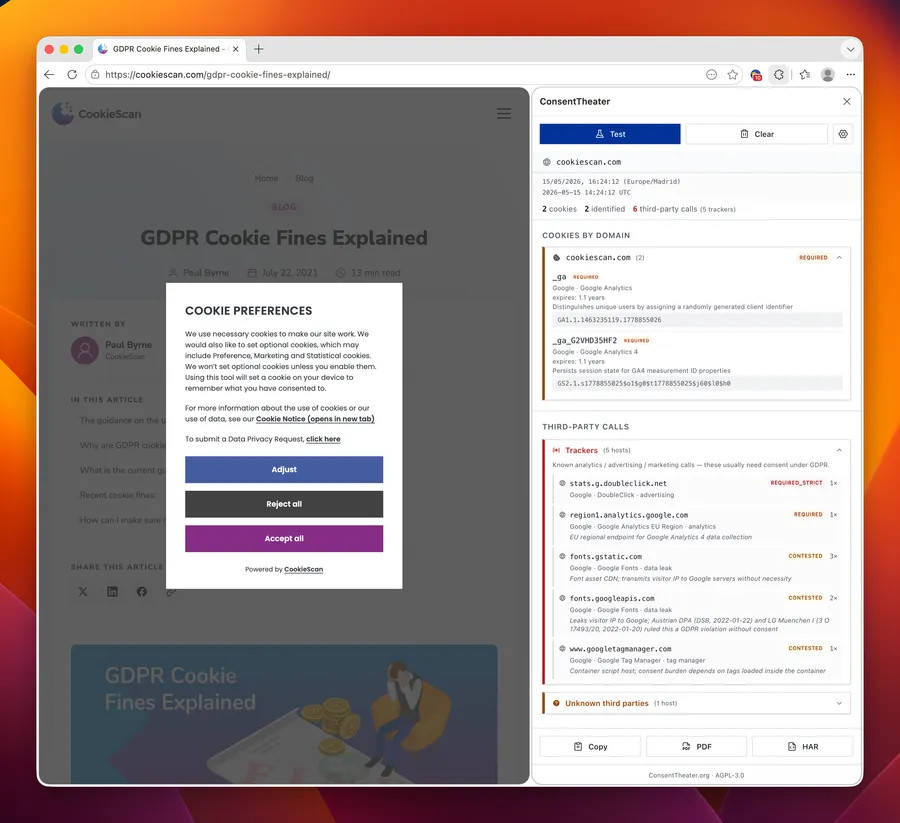
For anyone curious about [the methodology](https://consenttheater.org/methodology/?utm_source=freshjuice.dev), the full audit captured on May 15, 2026 is available as a [PDF report](https://freshjuice.dev/_astro/consenttheater-cookiescan.com-2026-05-15T14-23-52.CaI0dZCO.pdf) and a [raw HAR network trace](https://freshjuice.dev/_astro/consenttheater-cookiescan.com-2026-05-15T14-23-52.Db1Vcubu.har).
The implementation is quite simple, and being compliant even more so, but people seem to go with the easy choice and forget to research what to actually do. Here is everything you need to know to truly understand cookie consent and the ways to implement it on your site while staying compliant with the most common laws.
## What is cookie consent?
Cookies, also known as Internet cookies, are text files containing small pieces of information that are used to identify your device when you visit a site or network. These small text files can include login details such as usernames and passwords associated with your device, as well as other data like browsing preferences, session information, and tracking identifiers used for analytics and advertising.
This information is quite important for website owners to understand users (i.e., it’s used by analytics tools to provide aggregated insights into visitor behavior, traffic sources, and site usage patterns), but also for users, as they have the ability to manage their privacy, control what data is collected, and decide how their browsing information is used. That ability is what we refer to as cookie consent. But why do we have to ask for their consent? Well, there are laws about it, but we will talk about that later.
### What are cookie consent banners?
Every time you visit a site for the first time, a pop-up or banner appears on your screen asking for your consent regarding cookies. It informs you about how cookies are used and typically gives you options such as accepting all cookies, rejecting non-essential cookies, or managing your preferences in more detail. These are what we call cookie consent banners.
This is what you need to implement to give users clear information and control over how their data is collected and processed. The banner must appear on entry to the site before non-essential cookies are set, and it should be accessible again so users can change or withdraw their consent at any time. That’s why pop-ups and sticky banners are the most common solutions among marketers, although, as [we have covered in detail before](https://freshjuice.dev/blog/your-cookie-banner-is-probably-illegal/), most of them still don’t actually meet compliance requirements.
### What countries require cookie consent?
Cookie consent is required in many regions, but not worldwide, as requirements vary significantly depending on where your users are located. The big ones are the EU’s GDPR (paired with the ePrivacy Directive specifically for cookies), the UK’s UK-GDPR and PECR after Brexit, and in the US a patchwork of state laws led by California’s CCPA. If you want to read what these laws actually say without wading through legalese, [ConsentTheater has a law reference section](https://consenttheater.org/law/?utm_source=freshjuice.dev) that puts each relevant article in plain language next to the official text. That’s why we always recommend being aware of the different laws out there (always prioritizing the ones your audience is from), as each region has its own rules regarding data privacy and cookie usage.
In practice, many websites stick to the strictest and most well-known laws as a safety approach, as in that way you’ll have most scenarios covered regardless of the user’s location.
## How does cookie consent work?
As we have already mentioned, cookie consent works by letting users know how their information is being collected by a site and giving them the option to accept or withdraw consent or choose how that collection is going to be handled. It’s something required by some laws across the globe, but there’s no real consensus regarding how to implement it.
However, as mentioned above, marketers usually go with the most internationally recognized laws as, in that way, they can ensure a higher level of compliance. One of the most important of these laws is the GDPR.
### What is GDPR cookie consent?
The [GDPR](https://europa.eu/youreurope/business/dealing-with-customers/data-protection/data-protection-gdpr/index_en.htm?utm_source=freshjuice.dev) stands for General Data Protection Regulation. This regulation is a data privacy law from the European Union that imposes strict rules on the collection, storage, and processing of personal data for individuals in the EU/EEA.
Regarding cookie consent, this law doesn’t say much about it, as within the 88 pages of requirements it only directly mentions cookies in this recital:
> [Recital 30](https://gdpr.eu/recital-30-online-identifiers-for-profiling-and-identification/?utm_source=freshjuice.dev)
>
> Online identifiers for profiling and identification
>
> Natural persons may be associated with online identifiers provided by their devices, applications, tools and protocols, such as internet protocol addresses, cookie identifiers, or other identifiers such as radio frequency identification tags. This may leave traces which, in particular when combined with unique identifiers and other information received by the servers, may be used to create profiles of natural persons and identify them.
However, this minimal appearance doesn’t mean that the GDPR doesn’t apply to cookies, as this recital basically states that, since cookies are a way to identify and qualify personal data, they are subject to the GDPR. However, the real European “cookie law” is the ePrivacy Directive, which explicitly addresses what to care about and what to do with cookie consent, supplementing in a way what the GDPR says.
Among the main requirements that can affect the use of cookies regarding both the GDPR and the ePrivacy Directive, you can find:
- Users must give you their explicit consent before collecting ANY cookies except strictly necessary cookies like shopping carts, login authentication, security, or load balancing.
- That user consent must be documented, collected, and stored to demonstrate compliance with data protection regulations and to provide proof in case of audits or disputes. This is very important to avoid fines and legal actions.
- You must give all the information regarding cookie recollection in plain language to make it accessible for everyone to understand. That information should be about the data tracked by each cookie and its purpose.
- Regardless of the level of consent given by users, you must provide access to your site.
- Consent withdrawal must be easy to find and accessible, and it should be as simple to withdraw consent as it is to give it.
- All of this must be accessible for everyone by being not only easy to understand but also work with keyboard navigation and screen readers to make it compliant with the WCAG 2.2.
And none of these requirements are theoretical. [NOYB](https://noyb.eu/en/news?utm_source=freshjuice.dev), a privacy NGO that files GDPR complaints for a living, publishes regular write-ups on companies that get cookie consent wrong, from giant tech platforms to small publishers, and the list keeps growing. It is genuinely good reading if you want to see what the regulators actually care about, beyond what the legal text says.
As we have already mentioned, this law and the directive are from the EU and are usually the most looked at as they are the most complete, but another one that is a must-check, especially if you only work for the US, is the CCPA, which is specific to California but often treated as a key US privacy law by most marketers.
Like the GDPR and the ePrivacy Directive, the [California Consumer Privacy Act](https://oag.ca.gov/privacy/ccpa?utm_source=freshjuice.dev) also focuses on transparency and giving users the agency to choose what is done with their data. However, this law follows an opt-out model for cookies instead of the explicit opt-in required by GDPR. This means that users are generally allowed to have their data collected by default, but must be given a clear way to opt out of the sale or sharing of their personal information.
We know it can be difficult to manage data protection rules across different jurisdictions, and since we believe a more global approach is the best way to handle legal compliance despite this diversity, the GDPR is often the preferred baseline. This is because it sets a stricter standard, whereas the CCPA does not treat default data collection as non-compliant in the same way the GDPR does.
## How do I implement a cookie consent banner on my website?
Now that you know what cookie consent banners are and the requirements most commonly followed by marketers for legal compliance, you can start thinking about how to implement one on your site. To do so, there are three main ways:
### Plugins
The most common way to implement cookie consent banners is by installing plugins, which are prebuilt software extensions that you add to your website (usually through a CMS like WordPress) to handle cookie consent automatically for you.
This is usually the easiest way to do it, but it also comes with several inconveniences. We have already talked about it before, but we are not big fans of plugins as they often add unnecessary code, can affect performance, and usually give you less control over customization and compliance details.
Among the most popular cookie consent plugins are the [GDPR Cookie Compliance Plugin](https://wordpress.org/plugins/gdpr-cookie-compliance/?utm_source=freshjuice.dev) and Klaro, all of which offer straightforward implementation for most websites and CMS platforms, but if we take a closer look at the pros and cons, we can see the following:
| PROS | CONS |
| --- | --- |
| Easy implementation | Can affect page speed and overall performance |
| Free options available | Some advanced compliance features require paid plans |
| Applicable with almost every CMS and ecommerce platform | Often includes unnecessary code and features |
| Requires little to no technical knowledge | Limited customization options |
| Usually includes prebuilt compliance templates | Can create dependency on plugin updates and support |
| | Some plugins may conflict with other site tools or themes |
This is probably the easiest option for most beginners, and it is best suited for websites that prioritize speed of implementation over full control of compliance logic and design, but in the long run it can have many drawbacks, as you have read.
### Cookie consent management platforms
Another easy way of implementing cookie consent is by signing up for a cookie consent management platform. This is quite similar to plugins and, in most of the cases, it even requires a plugin installation, but these platforms usually offer a more complete solution with automated compliance updates, cookie scanning, and consent record management.
This option is usually preferred by businesses that want a ready-to-use solution without having to deal with manual coding or ongoing maintenance. Most of these platforms are designed to keep up with legal changes and simplify compliance management, making them a practical option for teams with limited technical expertise.
Based on what marketers say, the cookie consent management platforms most often recommended for websites are [OneTrust](https://www.onetrust.com/?utm_source=freshjuice.dev), [Cookiebot](https://www.cookiebot.com/?utm_source=freshjuice.dev), [iubenda](https://www.iubenda.com/?utm_source=freshjuice.dev), [CookieYes](https://www.cookieyes.com/?utm_source=freshjuice.dev), and [CookieScan](https://www.cookiescan.com/?utm_source=freshjuice.dev) (yes, the same CookieScan from the example at the start of this article), based on several [Reddit comments](https://www.reddit.com/r/divi/comments/1otgvvr/whats_the_best_consent_management_platform_cmp_in/?utm_source=freshjuice.dev) and similar discussions. These are frequently chosen due to their strong compliance features, broad CMS compatibility, and coverage for regulations like GDPR and CCPA. However, let’s take a closer look at their pros and cons.
| PROS | CONS |
| --- | --- |
| Easy to implement with little to no coding knowledge | Usually comes with monthly or yearly subscription costs |
| Some of them are automatically updated to reflect legal and compliance changes | Not all platforms are compliant with the legal requirements, as they are usually adapted to the country they are based in |
| Applicable with almost every CMS and ecommerce platform | Limited customization compared to manual implementation |
| Includes automated cookie scanning and consent tracking | You depend on a third-party provider |
| Offers built-in consent record storage | Some platforms may affect page speed and performance |
| Usually includes multilingual support | Migration can be difficult if switching providers later |
| | They usually aren’t available in many languages, often requiring you to pay for translations or rely on automatic translation, which can be tricky with legal requirements |
Even though this is one of the easiest and safest options for most businesses, it is best suited for teams that prefer convenience and automation over having full control of design and consent logic.
### Manual implementation
Manual implementation sounds intimidating, but in practice the install is no harder than any other cookie consent solution. Every CMP gives you a script tag to paste in your ``. Manual solutions do the same. The difference is in what happens after the script loads.
Take [Zest](https://cookiezest.com/?utm_source=freshjuice.dev), our own lightweight toolkit, as an example. It is free and fully open source. The entire codebase is on GitHub, no hidden services, no black-box bundle. Read it, fork it, make your own. It installs in a single line:
```
```
That is it. [Drop that into your site’s head](https://cookiezest.com/docs/getting-started/?utm_source=freshjuice.dev#installation) and, for the vast majority of websites, you are done. Zest will detect cookies and third-party trackers, block non-essential ones until the user gives consent, and surface a properly granular banner. If you want to see this work end to end on a real site, our [companion guide](https://freshjuice.dev/blog/audit-your-cookie-banner-with-ai/) walks through auditing your own page with the [ConsentTheater](https://consenttheater.org/extension/?utm_source=freshjuice.dev) extension, handing the trace to Claude or ChatGPT, and dropping the AI-generated Zest config straight into `` in about ten minutes.
The catch, which honestly applies to every other CMP equally, is that some sites need extra tuning. If you run a niche tracker or a custom analytics endpoint that Zest does not recognise out of the box, you can [add your own domains to the blocklist](https://cookiezest.com/docs/script-blocking/?utm_source=freshjuice.dev#custom-blocked-domains) through a small `window.ZestConfig` object. This is not a downside, it is granular control. Every serious CMP requires the same level of configuration if you want the banner to actually do what the law expects. The platforms that let you “set and forget” are usually the ones that quietly let trackers through, which is exactly what we saw at the start of this article.
Beyond Zest, there are other lightweight open toolkits with similar philosophies ([Klaro](https://github.com/kiprotect/klaro?utm_source=freshjuice.dev) is one of them, even though it is also distributed as a WordPress plugin). Pick whichever you like. What matters is that the solution actually blocks non-essential cookies before consent, which is the part most banners skip.
One last note. If your website already runs on HubSpot, they ship a [built-in cookie consent banner](https://knowledge.hubspot.com/privacy-and-consent/customize-your-cookie-tracking-settings-and-privacy-policy-alert?utm_source=freshjuice.dev) that follows a correct GDPR implementation flow. It does not technically block scripts and cookies the way a dedicated script-blocker does, but the consent capture, persistence, and integration with HubSpot’s own tracking are solid. For HubSpot-native sites, it is a sensible default before reaching for a third-party tool.
| PROS | CONS |
| --- | --- |
| One-line script install, no plugin or vendor lock-in | Edge cases or custom trackers may need a small JavaScript config tweak |
| Actively blocks non-essential cookies and trackers pre-consent | |
| Designed to support GDPR and CCPA compliance | |
| Fully customizable cookie consent UI | |
| Works with most CMS and e-commerce platforms | |
| Free and open source: read it, fork it, modify it | |
| Available in 12 languages | |
| Lightweight, no impact on page speed | |
| No third-party dependency or recurring cost | |
| Full control over data storage and consent logic | |
This option is best suited for teams that want full control over both compliance and design, without relying on a black-box third-party tool. But it works just as well for anyone who simply wants a script tag in their head that does the right thing by default.
## What are the key components of a legally compliant cookie banner?
After all this information, you might feel overwhelmed, but let’s break down in a simple way how to implement cookie consent while staying compliant:
1. **How it should appear**
It should always appear on entry pages and remain visible until the user accepts or withdraws consent, without being intrusive. In this way, you avoid loading cookies before the user has given consent, ensuring that consent is properly obtained first. A quick way to verify this is actually working on your own site is to audit it with [ConsentTheater](https://consenttheater.org/extension/?utm_source=freshjuice.dev), which will tell you exactly which cookies and trackers fire before any consent is given.
2. **What options should be available**
Even though there are essential cookies that can’t be rejected, you have to make available the option to accept recommended cookies, accept personalized cookies, and, especially, reject cookies. Always provide an equal choice of “reject” and “accept” that are both clearly visible.
Besides these options, the personalized version should allow users to choose between marketing, functional, or analytics cookies, creating a granular consent that fully informs users about the cookies being used.
3. **What if they want to change their consent?**
There’s the possibility that users change their mind and want to change their consent afterwards. This is quite common and you should always provide a persistent withdrawal option for users to revoke consent whenever they want to. Keep this in mind when implementing the banner.
4. **What about accessibility?**
Last but not least, you must make it accessible for everyone. We have already talked about accessibility in [other articles](https://freshjuice.dev/blog/how-to-make-social-media-more-accessible-to-strengthen-your-marketing-strategy/), but we are going to repeat it until we die: accessibility is non-negotiable. Ensure that the cookie consent banner works with keyboard navigation and screen readers to provide access for those who need it, in line with WCAG 2.2 guidelines.
5. **Then, what’s the best way to do it following the previous recommendations?**
The best way to do it is through manual implementation, and the install is as simple as pasting a single `